TL;DR: Quizlet locked the learn mode and Knowt's import extension keeps missing cards. So i built quick-cards, a Chrome extension that grabs your Quizlet set and exports it to whatever you want (txt, csv, json, pdf, printable flashcards, Anki decks, or directly to Knowt). Chrome only for now, install instructions at quickcards.oseifert.ch/install.
Quizlet
If you are a student and ever wanted to have digital flashcards you surely heard of Quizlet. I personally used it many years ago for learning French and English vocabulary but in 2022 they moved the "learn" and other modes into the paid section and removed the gravity game completely. Which is a bummer since i spent multiple days creating a Python cheat that plays the gravity game for me and gets me the highest score. I know, i should have learned the vocab, but at least i improved my coding skills. Now they don't even let you export vocabulary sets that other people made! I mean, it's not like you can't export them, but you need to copy the deck over into your library so you "own" it and then you can export it.
Knowt
So since i didn't want to use Quizlet anymore i looked for alternatives and found Knowt. This is not an ad for Knowt, more like the opposite. I have to say, it is a cool platform, i mostly just create a set and use their learn mode which is pretty similar to the Quizlet one. But that's about it. Their UI/UX is such a big pain point. Content shifts all the time and it's buggy and you can't do certain actions because content overlays them. It's like in the range where i think it's horrible but also it's free and gets the job done, so for those few moments i need it it's fine.
The key decision why i chose Knowt was that they had a simple extension for importing your Quizlet set into Knowt. I was able to open the Quizlet set my teacher provided, open the extension and bam got it in Knowt. And then they updated their extension as well... now it's just slow, logging in in the extension is a pain (or was, i'm talking about my experiences when i still used it) and the worst part is, since it's only scraping the HTML it's missing cards! Imagine you got a Quizlet set with 145 cards, click import to Knowt and now you got 100 because Quizlet only fetches 100 for the preview and you would need to click "Show more" to see all cards on the page!
quick-cards
If you have read any of my other blog posts, this is the section where i say:
So i built my own called quick-cards. I analyzed how Quizlet fetches their cards and created an extension that just fetches their own API when you are on the site. My goal was specifically to have the extension be as casual and easy to use as possible. You open a Quizlet set, and before your eyes even reach the bottom right corner the widget is already there:
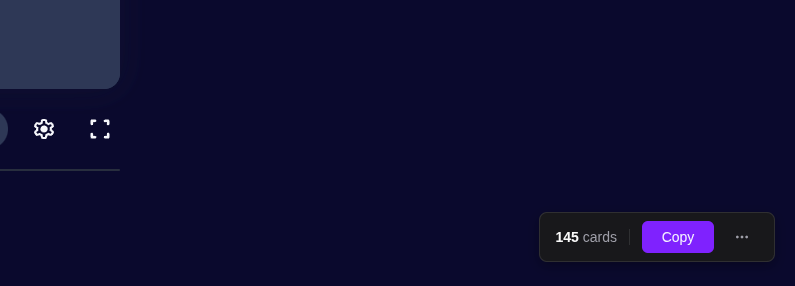
Just click "Copy" and you get all the cards nicely formatted in your configured format settings. Or you click the three dots and get more options!
After i got the basic logic done, i thought what other formats i could export. I added simple download buttons for .txt, .json and .csv files. Some of my friends sometimes also like the list as PDF, so i created that too. And while i was on it i also created the option for PDF flashcards. You just print the PDF double-sided and cut them out. Now you got physical flashcards!
Then there is Anki. Anki is like the OG of flash card apps. I have known it for some time, but didn't use it actively. Originally i didn't like the way that you just see the card and then tell the program how good you can remember the card. But while committing for a while to it i noticed that FSRS is pretty damn good and i'm questioning why i didn't use it earlier. Guess what i did next, right, i added an option for Anki decks.
This was its own rollercoaster. It turned out that no TypeScript Anki deck generators exist that could also create a preset with the settings i wanted. So i built ankipack. It specifically targets the latest Anki version (24.x+) and its modern schema (V18 with protobuf-encoded deck configs). So now in my extension you can click export -> Anki -> pick your exam date in a calendar, and it will generate the preset specifically for you!
Also since merging multiple sets into one by hand took too many seconds i created a merge feature. Just have all Quizlet tabs open and when clicking export it asks you if you want to merge them.
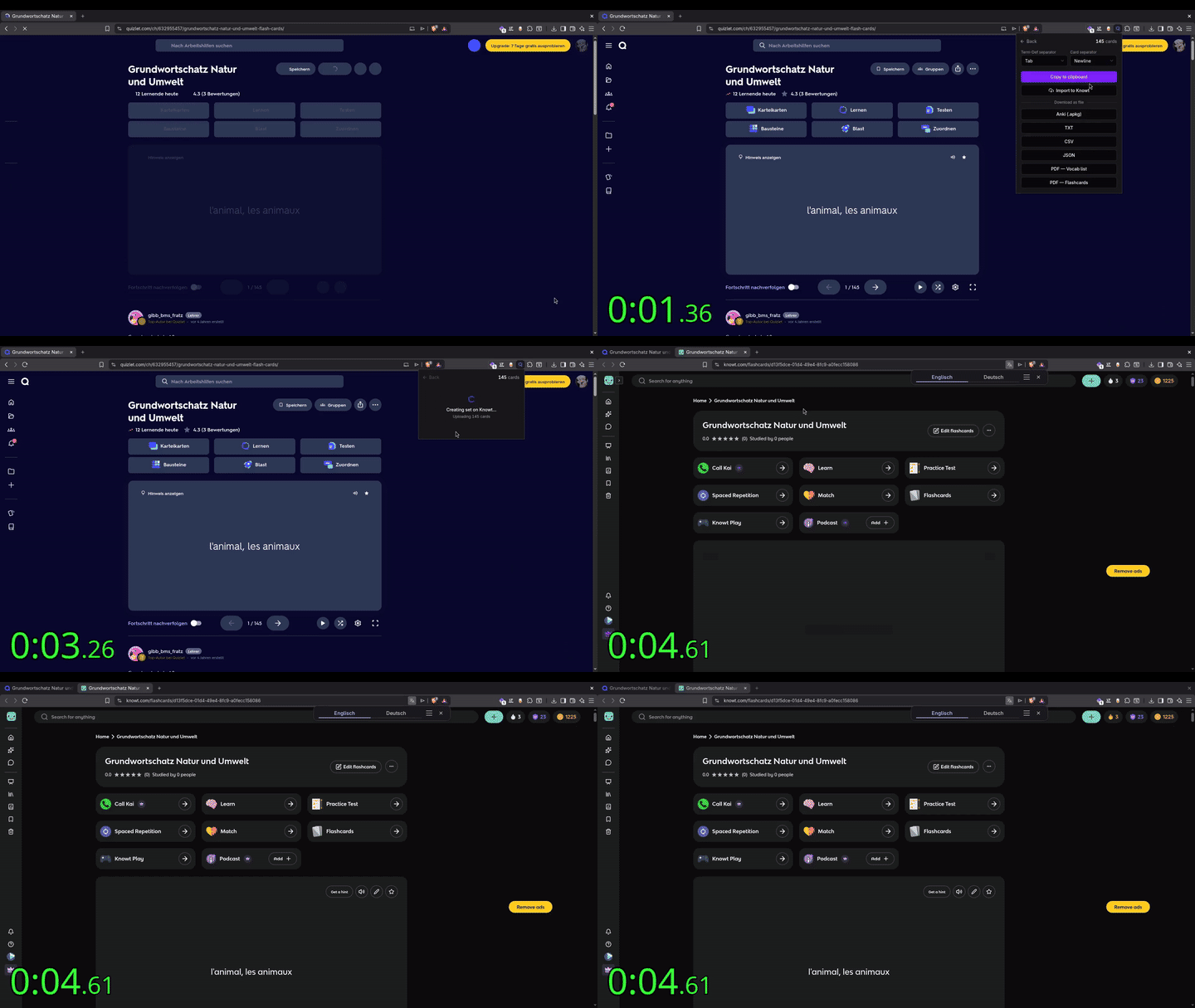
And here comes the reason why the Knowt extension is now obsolete. I added an import to Knowt button on the quick-cards extension. So the flow is now: quick-cards opens -> more options -> import to Knowt And you got your set imported to Knowt in under 5 seconds!
Install
Currently the extension is Chrome only and not on the webstore. But there are good install instructions at quickcards.oseifert.ch/install and if enough people actually use it i'll put it in the store. For now it's just not worth the hassle.
For those who stayed to the end. Here is a script you can just paste into the browser console and get a top score in Quizlet's card matching game
This script gives an average time of about 3.5 seconds. If you need to be even faster you can tune the settings at the top of the script. But be aware that at a specific speed Quizlet doesn't accept the result because it's too fast.
(async () => {
  // ===== config =====
  const CLICK_DELAY_MS = 120;   // delay between the two clicks of a pair
  const PAIR_DELAY_MS  = 250;   // delay after a completed pair
  const START_WAIT_MS  = 1500;  // wait for board to appear after clicking start
  const MAX_ITERS      = 500;   // safety stop
  // ==================

  const C = 'color:#7F77DD;font-weight:bold';
  const log  = (m, ...a) => console.log(`%c[Match]%c ${m}`, C, '', ...a);
  const warn = (m, ...a) => console.warn(`%c[Match]%c ${m}`, C, '', ...a);
  const err  = (m, ...a) => console.error(`%c[Match]%c ${m}`, C, '', ...a);
  const sleep = ms => new Promise(r => setTimeout(r, ms));
  const norm = s => (s || '').trim().toLowerCase().replace(/\s+/g, ' ');

  const realClick = (el) => {
    const r = el.getBoundingClientRect();
    const o = { bubbles: true, cancelable: true, view: window,
                clientX: r.left + r.width/2, clientY: r.top + r.height/2 };
    el.dispatchEvent(new PointerEvent('pointerdown', { ...o, pointerType: 'mouse' }));
    el.dispatchEvent(new MouseEvent('mousedown', o));
    el.dispatchEvent(new PointerEvent('pointerup',   { ...o, pointerType: 'mouse' }));
    el.dispatchEvent(new MouseEvent('mouseup', o));
    el.dispatchEvent(new MouseEvent('click', o));
  };

  const isVisible = (el) => {
    if (!el?.isConnected) return false;
    const r = el.getBoundingClientRect();
    if (r.width < 1 || r.height < 1) return false;
    const cs = getComputedStyle(el);
    return cs.visibility !== 'hidden' && cs.display !== 'none' && parseFloat(cs.opacity) > 0.1;
  };

  // 1. extract set id
  const m = location.pathname.match(/^\/(?:[a-z]{2}\/)?(\d+)(?:\/|$)/);
  if (!m) { err('Could not parse set ID from URL'); return; }
  const setId = m[1];
  log(`Set ID: ${setId}`);

  // 2. fetch cards (paginated)
  log('Fetching cards...');
  const cards = [];
  let page = 1, pagingToken = '';
  const perPage = 200;
  while (true) {
    const qs = new URLSearchParams({
      'filters[studiableContainerId]': setId,
      'filters[studiableContainerType]': '1',
      perPage: String(perPage),
      page: String(page),
    });
    if (pagingToken) qs.set('pagingToken', pagingToken);

    const res = await fetch(`https://quizlet.com/webapi/3.4/studiable-item-documents?${qs}`, { credentials: 'include' });
    if (!res.ok) { err(`API returned ${res.status}`); return; }
    const data = await res.json();
    const resp = data?.responses?.[0];
    const items = resp?.models?.studiableItem || [];

    for (const it of items) {
      const term = it.cardSides?.[0]?.media?.find(x => x.plainText)?.plainText;
      const def  = it.cardSides?.[1]?.media?.find(x => x.plainText)?.plainText;
      if (term && def) cards.push({ term, def });
    }

    const total = resp?.paging?.total;
    pagingToken = resp?.paging?.token || '';
    if (items.length < perPage || (total != null && cards.length >= total)) break;
    page++;
  }
  log(`Got ${cards.length} cards`);
  if (!cards.length) { err('No cards fetched'); return; }

  // build pair lookup: each side knows its partner
  const pair = new Map();
  for (const { term, def } of cards) {
    pair.set(norm(term), norm(def));
    pair.set(norm(def), norm(term));
  }

  // 3. click start button inside #__next
  const root = document.getElementById('__next');
  if (!root) { err('#__next not found'); return; }

  const startRx = /spiel beginnen|start game|jouer|commencer|begin game|empezar|iniciar|gioca/i;
  let startBtn = [...root.querySelectorAll('button')].find(b => {
    const lab = (b.getAttribute('aria-label') || '') + ' ' + (b.textContent || '');
    return startRx.test(lab);
  });
  if (!startBtn) startBtn = root.querySelector('button[data-testid="assembly-button-primary"]');

  if (startBtn) {
    log(`Clicking start: "${(startBtn.getAttribute('aria-label') || startBtn.textContent || '').trim()}"`);
    realClick(startBtn);
    await sleep(START_WAIT_MS);
  } else {
    warn('No start button found (assuming game already running)');
  }

  // 4. matching loop
  const getTiles = () => {
    const nodes = root.querySelectorAll('.FormattedText[aria-label]');
    const out = [];
    for (const n of nodes) {
      // FormattedText -> .t1s3w3lt -> .c13hkcga -> tile container
      const tile = n.parentElement?.parentElement?.parentElement;
      if (!tile || !isVisible(tile)) continue;
      out.push({ tile, text: n.getAttribute('aria-label') || '' });
    }
    return out;
  };

  log('Matching started');
  let matched = 0, stuck = 0, prevCount = -1;

  for (let i = 0; i < MAX_ITERS; i++) {
    const tiles = getTiles();

    if (tiles.length === 0) {
      log(`%c✓ Done. Matched ${matched} pairs.`, 'color:#1D9E75;font-weight:bold');
      return;
    }

    if (tiles.length === prevCount) {
      if (++stuck > 3) { err('Stuck. Remaining:', tiles.map(t => t.text)); return; }
    } else { stuck = 0; prevCount = tiles.length; }

    // map normalized text -> DOM tile (for currently visible tiles)
    const visible = new Map();
    for (const t of tiles) {
      const k = norm(t.text);
      if (!visible.has(k)) visible.set(k, t.tile);
    }

    // find first tile whose partner is also visible
    let A, B, aTxt, bTxt;
    for (const t of tiles) {
      const partner = pair.get(norm(t.text));
      if (partner && visible.has(partner) && visible.get(partner) !== t.tile) {
        A = t.tile; aTxt = t.text;
        B = visible.get(partner); bTxt = partner;
        break;
      }
    }

    if (!A) {
      warn('No pair found among visible tiles:', tiles.map(t => t.text));
      await sleep(400);
      continue;
    }

    matched++;
    log(`${matched}. "${aTxt}"  ↔  "${bTxt}"`);
    realClick(A);
    await sleep(CLICK_DELAY_MS);
    realClick(B);
    await sleep(PAIR_DELAY_MS);
  }

  err(`Hit max iterations (${MAX_ITERS})`);
})();
Thanks for reading! Check it out here: